
Managed Switch Port Mapping Tool2.75 - Download
You'll be able to download in few seconds.
Publisher Description
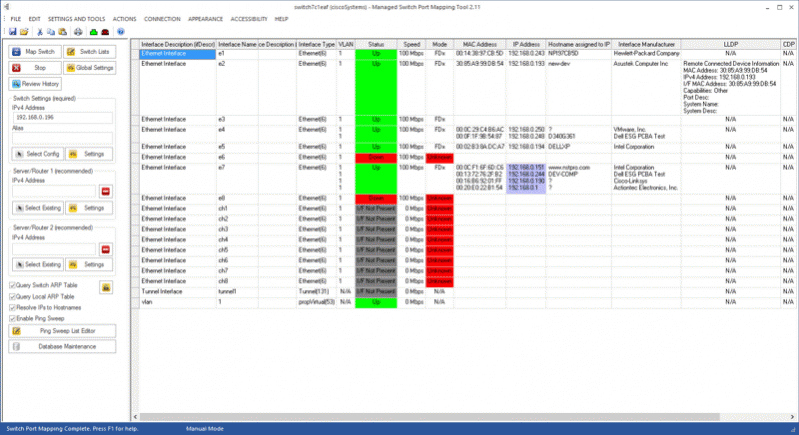
The Managed Switch Port Mapping tool maps the physical port connections of a managed network switch to MAC and IP addresses of the attached devices using SNMPv1/v2c/v3.
Capable of mapping many different brands and models of managed switches.
Saves technicians time mapping out the physical layout of your network by helping identify network devices attached to the physical switch ports.
Shows multiple downstream devices connected by hubs or other switches - LLDP and CDP report the directly connected devices.
Switch Lists allow you to map a set of switches.
Command Line lets you map a single switch or a Switch List on a scheduled basis using Windows Task Scheduler.
Shows VLAN assignment, port status, speed, duplex, bytes in/out, connected device interface manufacturer, LLDP, CDP connected devices, interface bandwidth utilization and more.
Shows LACP/LAG and PAGP link information.
Shows the elapsed time since a port has changed from up to down or vice versa. Use to see how long a device has been connected to a port.
Reports Microsoft and VMWare virtual operating systems attached to ports.
History Database records all switch mappings. Database is searchable and you can reload previous mappings back into the results grid.
Shows Spanning Tree Protocol status and root information.
Spreadsheet format results can be printed in color and searched for text strings.
Export results to XML or tab delimited text. The XML file can be directly opened by Microsoft Excel XP/2003/2007 or OpenOffice Calc.
Results can be saved and reloaded for later review using XML.
Switch and device 'configurations' including IPs and community names are automatically saved in an SQLite database and can be loaded for rapid change between multiple switches. No need to re-enter switch information.
About Managed Switch Port Mapping Tool
This Network Monitoring program is available in English. It was last updated on 29 September, 2026. Managed Switch Port Mapping Tool is compatible with the following operating systems: Windows.
The company that develops Managed Switch Port Mapping Tool is Northwest Performance Software, Inc.. The latest version released by its developer is 2.75.
The download we have available for Managed Switch Port Mapping Tool has a file size of 9.4 MB. Just click the green Download button above to start the downloading process. The program is listed on our website since 2017-05-26 and was downloaded 0 times. We have already checked if the download link is safe, however for your own protection we recommend that you scan the downloaded software with your antivirus. Your antivirus may detect the Managed Switch Port Mapping Tool as malware if the download link is broken.
How to install Managed Switch Port Mapping Tool on your Windows device:
- Click on the Download button on our website. This will start the download from the website of the developer.
- Once the Managed Switch Port Mapping Tool is downloaded click on it to start the setup process (assuming you are on a desktop computer).
- When the installation is finished you should be able to see and run the program.
Program Details
System requirements
Download information
Pricing
Version History
version 2.75
posted on 2017-05-26
Fixed problem with missing text in Mode column. Updated SQLite and mac address to manufacturer database.
version 2.74
posted on 2017-05-16
Added 4 new optional columns. Shows Cisco PAGP links. New report table. Many fixes and minor improvements. Updated SQLite and mac address to manufacturer database.
version 2.73
posted on 2017-02-23
Added JSON results exporting. Improved used/unused ports detection algorithm. Limited number of IPs associated with a MAC address in the display grid. Fixed XML exporting issues. Updated SQLite and mac address to manufacturer database.
version 2.72
posted on 2016-11-10
Fixed problem calculating LAG/Trunk speeds. Speed and presentation improvements for the IP address and hostname columns. Added right click option to highlight whole row. Updated mac address to manufacturer database.
version 1.95
posted on 2008-11-05
improved switch mapping algorithm, improved user interface
Disclaimer
External Download
We do not host Managed Switch Port Mapping Tool on our servers. We did not scan it for viruses, adware, spyware or other type of malware. This app is hosted by the software publisher and passed their terms and conditions to be listed there. We recommend caution when installing it.
The external download link for Managed Switch Port Mapping Tool is provided to you by apps112.com without any warranties, representations or guarantees of any kind, so access it at your own risk.
If you have questions regarding this particular app contact the publisher directly. For questions about the functionalities of apps112.com contact us.
